Register for Classes at CWI
To register for dual credit classes held on campus or online through CWI, students must submit a Dual Credit Registration Packet.
Students planning to take Math or English classes, or who did not attend an accredited high school, must also verify their academic skill level before registering. This can be done by submitting ACT, SAT, or ISAT score reports or completing placement testing.
To register for classes, complete and submit the Dual Credit Registration Packet to request registration for dual credit classes for the current or upcoming semester. All students must submit a registration packet every semester before registering for classes.
Schedule Change Form
Already submitted your registration packet? Use the Dual Credit Schedule Change Form form to:
- Add another class to your existing schedule.
- Switch sections of a class you have already requested.
Important: You must submit a Dual Credit Registration Packet each semester before submitting a Schedule Change Form. The Schedule Change Form cannot be used as your initial request to register for classes.
- Browse available classes using Class Search.
- Search for a course by entering the subject and course number in the top-right search bar (e.g., HIST 101), or use the Advanced Search options.
- Filter your results:
- Under Availability, select Open Sections Only.
- Under Terms, select the correct semester.
- You must re-select the filters each time you start a new class search.
- Select View Available Sections for the course you want to take.
- Review the available sections, listed in this format: subject, course number, section number (e.g., HIST-101-001W).
- Pay close attention to course dates and locations to make sure the section works with your schedule.
Important: If no sections are listed, the course may not be offered that semester or all sections may be full. Dual credit students cannot be added to waitlists.
Important Dates – 16-week Classes
| On Campus & Online Classes at CWI | Fall 2026 | Spring 2027 | Summer 2027 |
|---|---|---|---|
| OtterBound Registration Begins | Apr 20 | Nov 2 | Feb 22 |
| Dual Credit Registration Begins | Apr 27 | Nov 9 | Mar 1 |
| Registration Deadline | Aug 14 | Jan 15 | Jun 4 |
| Last Day to Drop Classes Without a W | Aug 28 | Feb 1 | Jun 11 |
| Last Day to Withdraw (W grades issued) | Nov 6 | Apr 9 | Jul 16 |
| Tuition & Fees Due | Dec 11 | May 14 | Jul 30 |
View important dates for 4- or 8-week class sessions on the Academic Calendar. Please note, the Academic Calendar does not reflect dual credit registration deadlines. Dual credit students must submit registration by the Friday before the semester begins.
Register for High School or IDLA Classes
Follow the steps below to register for dual credit classes held at your high school or through IDLA.
Browse the Dual Credit Catalog to view CWI dual credit classes offered at various high schools across Idaho. Check with your high school counselor to learn which classes are available at your school.
If this is your first time registering for dual credit classes, you must first create a DualEnroll account. If you are a returning student, see the Steps to Register section below.
View Video Instructions Create a DualEnroll Account
- Select Create My Account.
- Complete the required fields, then click Create Account.
- Check your email to confirm and activate your account.
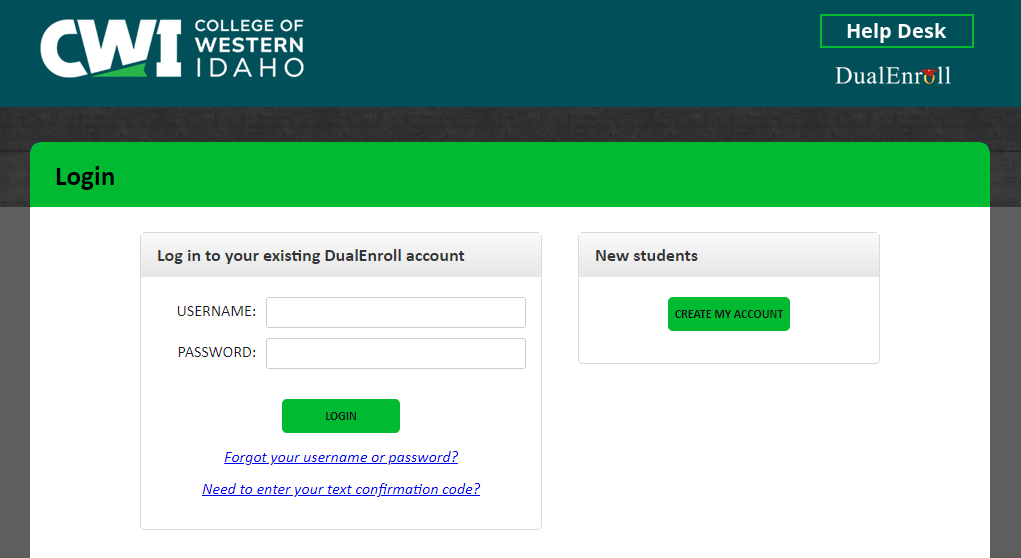
- Once your account has been created, log in and complete the pre-registration steps in the Status tab.
Once you have a DualEnroll account, you are ready to register for classes.
- Select the Courses tab.
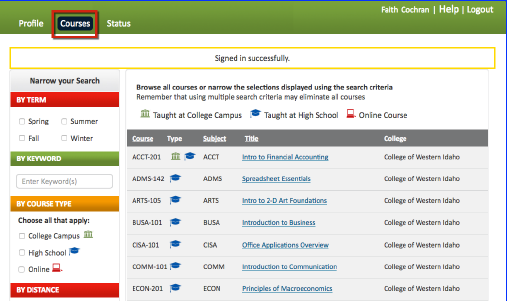
- Find the class you plan to take in the list of available courses.
- Select the section offered by your instructor, and click Register.
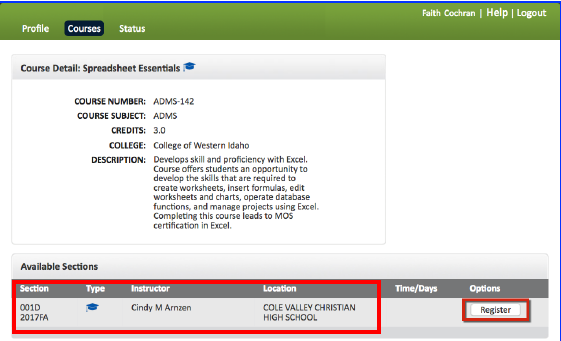
- To register for more than one class, repeat the process by going to the Courses tab.
- Parents will receive an email notifying them of their students intent to register.
- Check your email for confirmation your registration has been completed. Processing may take several business days to complete.
Important Dates
| High School & IDLA Classes | Summer 2026 | Fall 2026 | Year-Long Classes & Spring 2027 |
|---|---|---|---|
| DualEnroll Registration Begins | Jun 1 | Aug 17 | Jan 4 |
| DualEnroll Registration Deadline | Jun 19 | Oct 9 | Mar 5 |
| Last Day to Drop Classes Without a W | Jul 17 | Nov 6 | Apr 2 |
| Last Day to Withdraw (W grades issued) | Aug 7 | Nov 27 | Apr 23 |